Leave Your Message

Top Dementia Clock for Seniors What Is Best?

Choosing the Top Dementia Clock for Seniors requires more than comparing large screens or attractive features. A Dementia Clock should reduce daily uncertainty, especially when morning light enters through the bedroom curtains and the date feels unclear. It cannot treat dementia. It can, however, support orientation, routines, and calmer communication.

The World Health Organization’s Global Status Report on the Public Health Response to Dementia estimates that more than 55 million people live with dementia worldwide. It also reports nearly 10 million new cases each year. In the United States, the Alzheimer’s Association’s 2024 Facts and Figures report estimates 6.9 million adults aged 65 and older are living with Alzheimer’s dementia. These figures show why practical design matters. They do not prove that every clock works equally well.

Geriatrician Bill Thomas has said, “The goal of eldercare should be to create a human habitat.” A suitable Dementia Clock should fit that habitat, not dominate it. Look for clear day-and-date wording, strong contrast, adjustable brightness, readable numbers, and dependable power backup. Simple alarms may help with meals or medication reminders, but caregiver guidance remains essential. Evidence for consumer clock features is still limited. That deserves honesty.

The best model depends on vision, hearing, room lighting, sleep patterns, and personal habits. A clock that helps one senior may frustrate another. Test it beside the bed, at eye level, during both daylight and nighttime. Small details matter. Reliability matters more.
Top Dementia Clock for Seniors What Is Best?

What Is a Dementia Clock and How Does It Help Seniors?

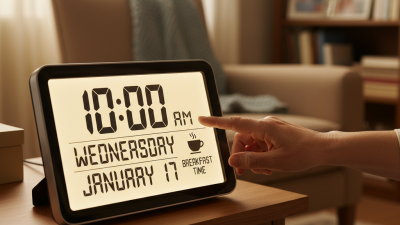
A dementia clock is a clear time-orientation tool designed for seniors with memory loss. It usually displays the day, date, time, and part of the day in large, readable text. Some models also show simple prompts, such as “morning” or “evening.” This reduces confusion when a senior wakes at 3 a.m. and believes it is time for breakfast.

The best dementia clock should match the person’s abilities, not simply offer the most features. High contrast, bright lettering, and a simple layout can help someone with reduced vision. An automatic dimming function may prevent sleep disruption. A caregiver might place the clock beside a favorite chair, where sunlight and room lighting do not create glare. Clear displays can support routines, including meals, medication checks, appointments, and rest.

It is not a cure.

A clock cannot replace human support or professional care. Some seniors may still misread dates, especially during illness or late-day confusion. Caregivers should observe how the person uses it for several days and adjust its location or settings. An occupational therapist can offer practical guidance when vision, hearing, or cognitive changes are significant. One limitation is easy to overlook: too many symbols can make the clock harder to understand. Simple may be better, though that choice deserves regular review as dementia progresses.
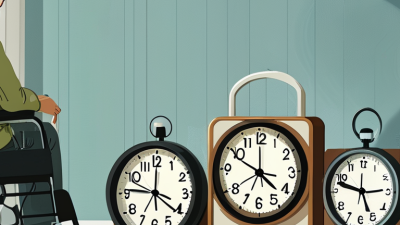
Key Features to Look for in a Dementia-Friendly Clock

Choosing a dementia-friendly clock starts with daily routines, not decoration. The World Health Organization reports that more than 55 million people live with dementia worldwide, with nearly 10 million new cases each year (WHO, 2023). That scale matters. A clear clock can reduce repeated questions, but it cannot replace human reassurance. Look for oversized, high-contrast numbers and an uncluttered face. “7:30 AM” is often easier to interpret than hands, abbreviations, or decorative graphics. Avoid reflective glass. Window glare can erase useful information.

Key features should support orientation without creating new confusion. Choose automatic time adjustment, readable day and date, and separate morning and night indicators. A warm, dimmable display may feel kinder in a dark bedroom. Test the alarm volume from the hallway, then test it again beside the bed. The Alzheimer’s Association’s 2024 report estimates that 6.9 million Americans aged 65 and older are living with Alzheimer’s dementia. Care needs vary widely, so accessibility settings matter. Large controls, simple setup, and dependable battery backup can help during outages or rushed mornings.

Safety deserves careful judgment. Avoid distracting animations, complicated menus, and excessive alerts. Place the clock where the person naturally looks. Ask the user to read it after waking. If they hesitate, reconsider the design. I would not assume a “dementia clock” is automatically suitable. Some helpful-sounding features may feel confusing in practice. Caregiver observation, occupational therapy guidance, and a short home trial offer stronger evidence than specifications alone.

Top Dementia Clock for Seniors: Key Features to Look For

A dementia-friendly clock should use a clear display, strong contrast, simple wording, and highly visible information such as the time, day of the week, date, and part of the day. The chart shows the minimum contrast ratios defined by WCAG 2.2 for different digital display elements.

Higher contrast can make clock information easier to distinguish, especially for older adults with reduced vision. For a senior-friendly clock, prioritize large text, uncluttered layouts, non-glare surfaces, and consistent labels such as “Morning,” “Afternoon,” “Evening,” and “Night.” Contrast values are based on WCAG 2.2 minimum requirements.

Types of Clocks Suitable for Seniors With Dementia

The best dementia clock is not always the most advanced one. The right choice depends on the senior’s vision, hearing, memory, and daily routine.

Large digital clocks with clear numbers can reduce confusion, especially in rooms with soft lighting. A day-and-date clock may help someone understand whether it is morning, afternoon, or night. This feature is useful when ordinary time feels abstract.

Some seniors respond well to talking clocks. They can announce the time without requiring strong eyesight. However, loud speech may startle a person or disturb sleep.

High-contrast analog clocks can work for seniors who still understand clock hands. Choose one with simple numbers and avoid decorative backgrounds.

In practice, caregivers should observe how the person uses the clock for several days. A clock can look perfect but still create frustration.

An occupational therapist may offer useful advice when dementia symptoms, vision loss, or hearing changes overlap.

Tips:

Place the clock near the bed or favorite chair. Keep it at eye level. Use gentle lighting, not glare.

Match the clock display with familiar routines, such as meals or medication reminders. Check whether the senior can read it independently.

If they repeatedly ask the time, the design may need changing. Avoid assuming that a more expensive clock is better. Simple is often easier. But simple does not mean suitable for everyone.

How to Choose the Best Dementia Clock for Individual Needs

Top Dementia Clock for Seniors: How to Choose the Best Dementia Clock for Individual Needs

Choosing a dementia clock should begin with the person, not the product. Consider eyesight, hearing, memory changes, and daily routines. A large, high-contrast display may help someone with poor vision. Clear words such as “Monday morning” can be easier than small digital numbers. Avoid crowded screens. Simple is often safer.

Check whether the clock shows the full day, date, and part of the day. Some people confuse afternoon with evening, especially after a nap. A model with gentle spoken reminders may support meals, medication schedules, or appointments. However, repeated alerts can cause anxiety or frustration. Test the volume in the person’s usual room. It should be noticeable, not startling.

Placement matters too. Put the clock near the bed, kitchen table, or favorite chair. Keep it at eye level and away from window glare. Battery backup is useful during power cuts. Caregivers should also check how easily the settings can be changed, since incorrect dates may increase confusion. Occupational therapy guidance can help when vision, hearing, or movement problems are complex.

No clock fits everyone. A feature that helps one senior may overwhelm another. My first choice might still be wrong after a week of use. Watch actual reactions, ask simple questions, and adjust slowly. Comfort and confidence matter more than an impressive feature list.

Safe Setup and Daily Use of a Dementia Clock

Choosing a dementia clock for a senior is less about decoration and more about reducing daily confusion. The World Health Organization estimates that over 55 million people live with dementia worldwide. Many experience disrupted time awareness, especially during mornings, evenings, or unfamiliar routines.

Place the clock where it is visible from the bed or favorite chair. Use large, high-contrast letters showing the day, date, and time of day. Avoid glare from windows. Set the correct time with the senior present, then ask them to explain what the display means. That small test can reveal misunderstanding. Keep the clock connected to a reliable power source, and check its settings after power interruptions. A backup battery may help, but it is not foolproof.

Daily use works best with simple spoken cues. Say, “It is Tuesday morning,” instead of asking, “What day is it?” Pair the clock with familiar routines, such as breakfast at 8:00 or a walk after lunch. The Alzheimer’s Association reported that 11 million Americans provided unpaid dementia care in 2023. Caregivers need practical support, too. Record confusing times and adjust the routine with a healthcare professional. Do not use the clock as the only reminder for medicine, wandering risks, or emergencies. I have found that fewer display features often work better, although personal preferences can differ. Recheck comfort, accuracy, and visibility every few weeks. A clock can assist memory, but it cannot replace human reassurance.

Top Dementia Clock for Seniors What Is Best? - Safe Setup and Daily Use of a Dementia Clock

Clock Type Best For Useful Features Safe Setup Daily Use Guidance Important Limitations
Large-display day and date clock Older adults who frequently lose track of the day, date, or time of day. Large readable characters, weekday and date display, clear AM/PM indication, and automatic daylight-saving adjustment. Place it at eye level in a familiar, well-lit location. Confirm the time zone, date, and daylight-saving setting before use. Use it as a visual reminder during morning and evening routines. Keep the display uncluttered and easy to see from the usual chair or bed. It supports orientation but does not replace personal reminders, supervision, or medical care.
Day-period clock People who understand morning, afternoon, evening, and night more easily than exact clock time. Simple labels such as morning, afternoon, evening, and night; some models also show the day and date. Choose a display with strong contrast and avoid placing it behind lamps, decorations, or reflective glass. Refer to it using consistent phrases, such as “It is evening now, so we are getting ready for dinner.” Some people may interpret the periods differently; observe the person’s response and use familiar routines alongside the clock.
Digital clock with large numerals Seniors who can read numbers more easily than hands on an analog clock. High-contrast digits, adjustable brightness, optional 12-hour format, and a simple interface. Set the correct 12-hour or 24-hour format. Reduce brightness at night if it interferes with sleep, while keeping the display visible enough for orientation. Use consistent explanations of the time and connect it with daily activities, meals, appointments, and rest periods. A time-only display may not provide enough information for someone who needs weekday or date support.
Analog clock with clear markings People who are familiar with traditional clock faces and can distinguish the hour and minute hands. High-contrast hands, large numbers, minimal decoration, and clear five-minute markings. Hang it securely at eye level and ensure the hands are not hidden by glare. Avoid designs with busy patterns or very thin hands. Use short, concrete explanations such as “The long hand is on twelve and the short hand is on three.” Reading an analog clock can become difficult as visual-spatial or memory problems progress.
Clock with medication or activity reminders Households that need prompts for regular activities, such as meals, hydration, appointments, or bedtime. Audible or visual alerts, scheduled reminders, repeat functions, and clearly labeled activity prompts. Keep alert volume appropriate and test every reminder. Medication schedules should be checked with a pharmacist, nurse, or clinician. Use only a few important reminders at first. Review the schedule regularly with a caregiver and remove outdated alerts. A reminder is not proof that medication was taken. Some people may ignore, misunderstand, or become distressed by alarms.
Battery-supported clock Homes where power interruptions are possible or where the clock must remain portable. Battery backup, low-battery warning, stable stand, and easy-to-read display. Use the recommended battery type, keep spare batteries safely stored, and check the time after a battery change or power outage. Add a recurring caregiver check for battery status and accuracy. Batteries require maintenance and may create a hazard if accessible to a person who may swallow small objects.
Connected or remotely managed clock Care settings where an authorized caregiver needs to update reminders or check clock settings from another location. Remote setting changes, automatic time updates, reminder management, and status notifications, depending on the device. Use a secure home network, strong account credentials, privacy-conscious settings, and a backup plan for internet or power loss. Explain alerts in advance, review settings with the senior, and check that notifications remain helpful rather than disruptive. Connectivity, privacy, subscription, and technical-support requirements vary. It should not be treated as an emergency response system unless specifically designed and approved for that purpose.
Safe selection checklist: Prioritize readability, strong contrast, simple controls, stable placement, reliable time accuracy, and the senior’s personal preferences. Introduce one feature at a time, demonstrate it repeatedly, and review the setup whenever vision, cognition, medication, or daily routines change.